Documentation

Recurring Payments (Subscriptions)
Overview
DashX Subscriptions enable merchants to create recurring payment links for subscription-based services. Customers approve an allowance once, and the system automatically processes recurring charges at specified intervals.
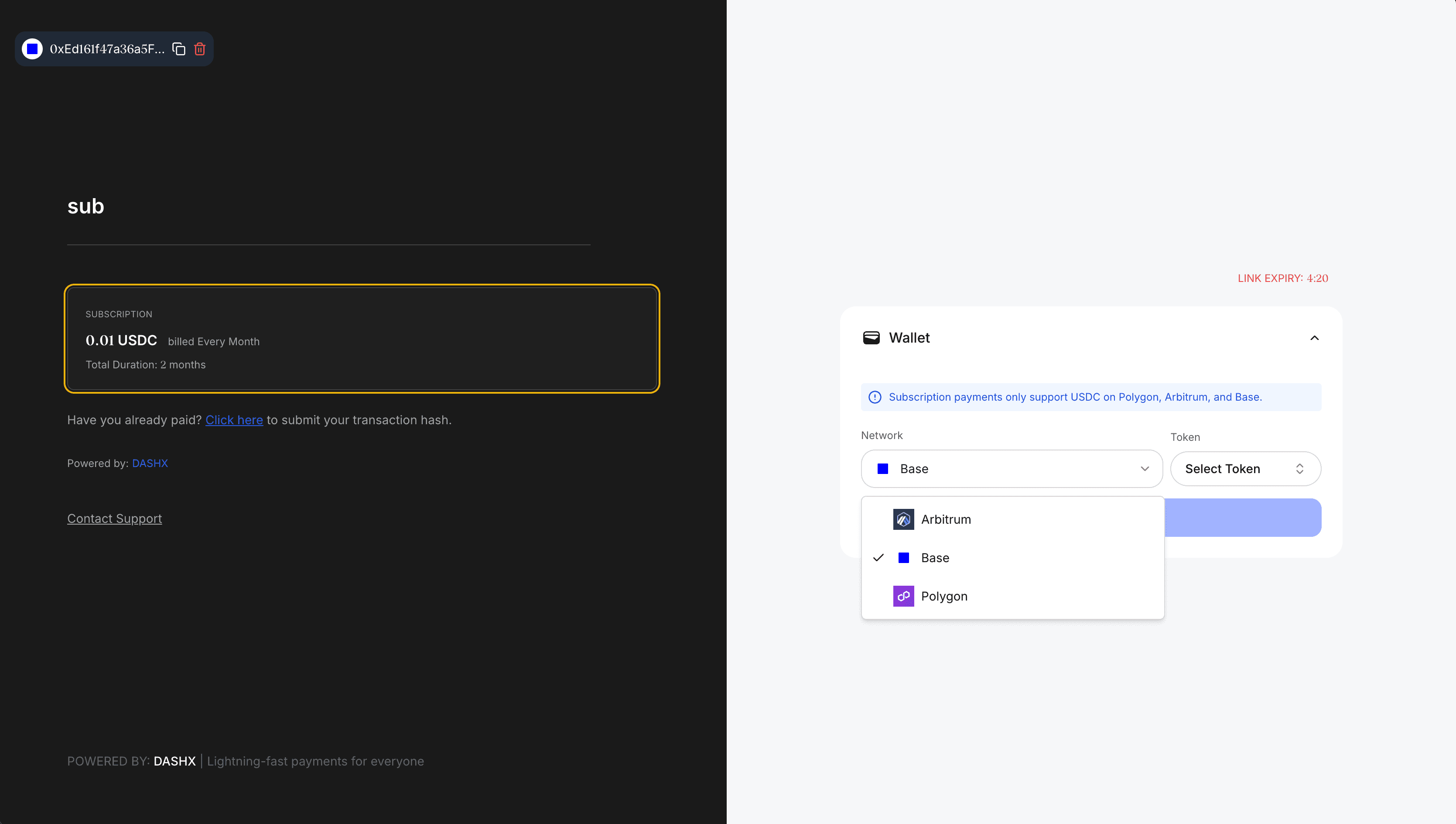
How It Works
- Merchant creates a Payment Link with
link_type: "SUBSCRIPTION" - Customer visits the payment gateway link and subscribes by connecting their wallet
- Customer approves token allowance for the subscription amount × duration
- Subscription is automatically created and activated in the system
- Backend automatically processes recurring charges at the specified interval
- Webhook events are dispatched after each successful charge
Supported Chains
Subscription payments are currently supported on the following EVM-compatible chains:
Note: Currently, only USDC is supported as the payment currency for subscriptions. You can use "POL" or "MATIC" interchangeably for Polygon.
API Endpoints
1. Create Subscription Payment Link (Merchant)
First, create a payment link with subscription type to enable recurring payments.
POST https://beprod.dashx.xyz/payment-link/Headers
{
  "X-API-KEY": "your_api_key",
  "X-MERCHANT-ID": "your_merchant_id",
  "Content-Type": "application/json"
}
Request Body
{
  "link_type": "SUBSCRIPTION",
  "token": "USDC",
  "accepted_chain_symbols": ["ETH", "POL", "ARB"],
  "amount": "10.00",
  "title": "Premium Membership",
  "description": "Monthly premium subscription",
  "merchant": "your_merchant_wallet_id",
  "subscription_frequency": "MONTHLY",
  "subscription_interval": 1,
  "subscription_duration": 12,
  "collect_email": true,
  "customer_id": "customer_123"
}
Parameters
| Field | Type | Required | Description |
|---|---|---|---|
| link_type | string | Yes | Must be "SUBSCRIPTION" |
| amount | string | Yes | Amount to charge per interval (in USDC) |
| token | string | Yes | Currently only "USDC" is supported |
| accepted_chain_symbols | array | Yes | Supported chains: ["ETH", "ARB", "POL"]. Use "POL" or "MATIC" for Polygon |
| subscription_frequency | string | Yes | Options: "HOURLY", "DAILY", "WEEKLY", "MONTHLY", "QUARTERLY", "SEMI_ANNUALLY", "YEARLY", "CUSTOM" |
| subscription_interval | number | Yes | Interval value (e.g., 2 for every 2 months). Min: 1 |
| subscription_duration | number | Yes | Total duration in frequency units. Min: 1 |
| title | string | Yes | Title of the subscription |
| description | string | No | Description of the subscription |
| merchant | string | Yes | Merchant wallet ID |
| customer_id | string | No | Optional customer identifier |
| collect_email | boolean | No | Whether to collect customer email |
Response (201 Created)
{
  "message": "Payment link created successfully",
  "id": "a1b2c3d4-e5f6-7890-abcd-ef1234567890",
  "slug": "premium-membership-xyz123",
  "link": "https://gateway.dashx.xyz/gateway?slug=premium-membership-xyz123",
  "customer_id": "your_customer_id"
}
2. Customer Subscribes (Gateway)
Customers subscribe by visiting the payment gateway link (not via API). The subscription is automatically created when they approve the token allowance through the gateway interface.
Gateway Flow: Customer visits https://gateway.dashx.xyz/gateway?slug=your-link-slug → Connects wallet → Approves allowance → Subscription created automatically
Note: Direct subscription creation via API is not supported. All subscriptions must be created through the payment gateway interface.
3. Check Subscription Payment Status (Merchant)
Check the status of a subscription payment after allowance approval.
POST https://beprod.dashx.xyz/subscriptions/check-payment-status/Request Body
{
  "slug": "premium-membership-xyz123",
  "wallet_address": "0x742d35Cc6634C0532925a3b844Bc9e7595f0bEb",
  "subscription_id": "sub_xyz123abc456"
}
Response (200 OK)
{
  "status": "COMPLETED",
  "payment_id": "pay_abc123def456",
  "transaction_hash": "0x9876543210fedcba9876543210fedcba98765432...",
  "payment_date": "2024-10-14T12:05:30Z",
  "amount": "10.00",
  "subscription_status": "ACTIVE"
}
Status Values
PENDING- Payment is being processedCOMPLETED- Payment successfulSUCCESS- Payment successful (alternative status)FAILED- Payment failedEXPIRED- Payment window expiredCANCELED- Payment canceled
4. Cancel Subscription (Merchant)
Cancel an active subscription to prevent future charges. Requires merchant authentication via API key.
POST https://beprod.dashx.xyz/subscriptions/{subscription_id}/cancel/Headers
{
  "X-API-KEY": "your_api_key",
  "X-MERCHANT-ID": "your_merchant_id",
  "Content-Type": "application/json"
}
Response (200 OK)
{
  "status": "canceled",
  "message": "Subscription canceled successfully",
  "subscription_id": "f163d936-fa61-4b22-9085-478e6ff4fcf2"
}
Error Responses
401 Unauthorized: Missing or invalid API key
404 Not Found: Subscription not found
403 Forbidden: Not authorized to cancel this subscription (must be the merchant)
400 Bad Request: Subscription is already canceled
Note: Only the merchant who created the subscription can cancel it. Customers cannot currently cancel their own subscriptions through the API - they must contact the merchant.
5. List Subscriptions (Merchant)
Retrieve subscriptions for a customer wallet or merchant. Requires merchant authentication via API key.
GET https://beprod.dashx.xyz/subscriptions/?customer_wallet=0x...Headers
{
  "X-API-KEY": "your_api_key",
  "X-MERCHANT-ID": "your_merchant_id"
}
Query Parameters
| Parameter | Type | Description |
|---|---|---|
| customer_wallet | string | Filter by customer wallet address |
Response (200 OK)
[
  {
    "id": "sub_xyz123abc456",
    "payment_link": "a1b2c3d4-e5f6-7890-abcd-ef1234567890",
    "customer_wallet": "0x742d35Cc6634C0532925a3b844Bc9e7595f0bEb",
    "start_date": "2024-10-14T12:00:00Z",
    "end_date": "2025-10-14T12:00:00Z",
    "next_charge_date": "2024-11-14T12:00:00Z",
    "frequency": "MONTHLY",
    "interval": 1,
    "total_cycles": null,
    "cycles_completed": 1,
    "duration": 12,
    "status": "ACTIVE",
    "allowance_data": {
      "spender": "0x1234567890abcdef1234567890abcdef12345678",
      "token": "USDC",
      "amount": "10.00"
    },
    "last_tx_hash": "0x9876543210fedcba9876543210fedcba98765432...",
    "last_payment_date": "2024-10-14T12:05:30Z",
    "failed_attempts": 0,
    "max_failed_attempts": 3
  }
]
Integration Example
Complete Subscription Flow
import axios from 'axios';

const BASE_URL = 'https://beprod.dashx.xyz';
const API_KEY = 'your_api_key';
const MERCHANT_ID = 'your_merchant_id';

// Step 1: Merchant creates a subscription payment link
async function createSubscriptionLink() {
  const response = await axios.post(
    `${BASE_URL}/payment-link/`,
    {
      link_type: 'SUBSCRIPTION',
      token: 'USDC',
      accepted_chain_symbols: ['POL', 'ARB', 'ETH'],
      amount: '10.00',
      title: 'Premium Membership',
      description: 'Monthly premium subscription',
      merchant: MERCHANT_ID,
      subscription_frequency: 'MONTHLY',
      subscription_interval: 1,
      subscription_duration: 12,
      collect_email: true
    },
    {
      headers: {
        'X-API-KEY': API_KEY,
        'X-MERCHANT-ID': MERCHANT_ID,
        'Content-Type': 'application/json'
      }
    }
  );

  return response.data;
}

// Step 2: Customer visits gateway and subscribes
// The customer visits: https://gateway.dashx.xyz/gateway?slug={paymentLink.slug}
// They connect their wallet and approve the token allowance through the UI
// The subscription is automatically created when they approve the allowance

// Step 3: Merchant checks payment status
async function checkPaymentStatus(slug, walletAddress, subscriptionId) {
  const response = await axios.post(
    `${BASE_URL}/subscriptions/check-payment-status/`,
    {
      slug: slug,
      wallet_address: walletAddress,
      subscription_id: subscriptionId
    }
  );

  return response.data;
}

// Step 4: Merchant lists customer subscriptions
async function listCustomerSubscriptions(customerWallet) {
  const response = await axios.get(
    `${BASE_URL}/subscriptions/?customer_wallet=${customerWallet}`,
    {
      headers: {
        'X-API-KEY': API_KEY,
        'X-MERCHANT-ID': MERCHANT_ID
      }
    }
  );

  return response.data;
}

// Step 5: Merchant cancels subscription (if needed)
async function cancelSubscription(subscriptionId) {
  const response = await axios.post(
    `${BASE_URL}/subscriptions/${subscriptionId}/cancel/`,
    {},
    {
      headers: {
        'X-API-KEY': API_KEY,
        'X-MERCHANT-ID': MERCHANT_ID,
        'Content-Type': 'application/json'
      }
    }
  );

  return response.data;
}

// Example usage
async function main() {
  // Merchant creates payment link
  const paymentLink = await createSubscriptionLink();
  console.log('Payment link created:', paymentLink.slug);
  console.log('Share this link with customers:', paymentLink.link);

  // Customer visits the gateway link and subscribes (happens in browser UI)
  // After customer subscribes, merchant can list their subscriptions
  const customerWallet = '0x742d35Cc6634C0532925a3b844Bc9e7595f0bEb';
  const subscriptions = await listCustomerSubscriptions(customerWallet);
  console.log('Customer subscriptions:', subscriptions);

  // If merchant needs to cancel a subscription
  if (subscriptions.length > 0) {
    const result = await cancelSubscription(subscriptions[0].id);
    console.log('Cancellation result:', result);
  }
}

main();
Subscription Status Types
| Status | Description |
|---|---|
| ACTIVE | Subscription is active and charges will be processed |
| PAUSED | Subscription temporarily paused |
| CANCELED | Subscription canceled, no future charges |
| COMPLETED | All cycles completed successfully |
| PAST_DUE | Payment failed after multiple attempts |
| FAILED | Subscription creation or processing failed |
Webhook Events
DashX sends webhook events to your configured endpoint for subscription-related events. Each webhook includes an HMAC signature for verification.
Event Types
checkout_session.completed
Triggered when a subscription payment is successfully processed
checkout_session.canceled
Triggered when a subscription payment fails after maximum retry attempts
Webhook Payload Format
{
  "id": "evt_1a2b3c4d5e6f",
  "apiVersion": "2023-01-11",
  "created": 1697234567000,
  "object": "checkoutSession",
  "type": "checkout_session.completed",
  "data": {
    "object": {
      "id": "pay_abc123def456",
      "createdAt": "2024-10-14T12:05:30Z",
      "amountTotal": "10.00",
      "status": "SUCCESS",
      "currency": "USDC",
      "customer_id": "customer_123",
      "payment_link_id": "a1b2c3d4-e5f6-7890-abcd-ef1234567890",
      "payment_link_title": "Premium Membership",
      "payment_link_slug": "premium-membership-xyz123",
      "transaction_hash": "0x9876543210fedcba9876543210fedcba98765432...",
      "from_address": "0x742d35Cc6634C0532925a3b844Bc9e7595f0bEb",
      "payment_address": "0xd0dd2d1f25b3efdb24bdb224be2d65cd98b5a975",
      "chain_symbol": "ARB",
      "payment_amount": "10.00",
      "payment_processing_fee": "0.00",
      "updatedAt": "2024-10-14T12:05:35Z"
    }
  }
}
Webhook Headers
{
  "Content-Type": "application/json",
  "X-DashX-Signature": "t=1697234567000,v1=abc123def456..."
}
Verifying Webhook Signatures
Always verify the webhook signature to ensure the request is from DashX:
import hmac
import hashlib

def verify_webhook_signature(payload, signature_header, webhook_secret):
    # Extract timestamp and signature from header
    parts = signature_header.split(',')
    timestamp = parts[0].split('=')[1]
    signature = parts[1].split('=')[1]

    # Create HMAC signature
    expected_signature = hmac.new(
        webhook_secret.encode(),
        payload.encode(),
        hashlib.sha256
    ).hexdigest()

    # Compare signatures
    return hmac.compare_digest(signature, expected_signature)

# Usage in your webhook endpoint
@app.post('/webhook')
def handle_webhook(request):
    payload = request.body.decode('utf-8')
    signature = request.headers.get('X-DashX-Signature')
    webhook_secret = 'your_webhook_secret'

    if not verify_webhook_signature(payload, signature, webhook_secret):
        return {'error': 'Invalid signature'}, 401

    event = json.loads(payload)

    if event['type'] == 'checkout_session.completed':
        # Handle successful subscription payment
        payment_data = event['data']['object']
        print(f"Payment {payment_data['id']} completed for {payment_data['amountTotal']} {payment_data['currency']}")

    elif event['type'] == 'checkout_session.canceled':
        # Handle failed subscription payment
        payment_data = event['data']['object']
        print(f"Payment {payment_data['id']} failed after max retries")

    return {'received': True}, 200
Important Notes
- Customers must approve sufficient token allowance before the first payment
- The system automatically processes charges at the specified interval
- Webhook events are dispatched after each successful charge (
checkout_session.completed) - If a charge fails, the subscription remains ACTIVE and will be retried
- After max failed attempts (default: 3), subscription status changes to FAILED and a
checkout_session.canceledwebhook is sent - Always verify webhook signatures to ensure authenticity
- Currently, only EVM-compatible chains (BASE, ARB, POL) are supported
Support
For questions or assistance with subscription payments, contact our support team at [email protected].